Drone with Camera – L900 Pro SE GPS RC Drone, Dual HD Camera, Foldable & Brushless
Drone with Camera – L900 Pro SE GPS RC Drone, Dual HD Camera, Foldable & Brushless
Couldn't load pickup availability
L900 Pro SE GPS drone
A folding GPS drone that is easy to learn on
GPS position hold, four brushless motors and automatic return home, with a Full HD camera you tilt from the controller. The arms fold in, so it travels in a bag pocket.
It is made for learning to fly and for filming your own walks, trips and property from above. It is not a pro cinema drone, and this page tells you exactly what the camera records.
Holds its spot, flies home
GPS and a downward optical-flow sensor keep it in place when you let go of the sticks. On low battery or a lost signal it is designed to fly back to its takeoff point.
Four brushless motors
Quieter and longer-lasting than the brushed motors in toy drones.
Small enough to carry
About 6.7 x 4.9 x 2.2 in folded (17 x 12.5 x 5.5 cm), and 11.4 x 11.4 in with the arms out (29 x 29 cm).

The camera, honestly
Full HD video, tilted from the controller
The front camera is a Full HD camera on a motorized tilt: turn the dial on the controller to angle it anywhere from straight ahead to straight down, up to 90 degrees. A second camera underneath looks straight down, and you can switch the live view to it in the app.
- Video: 1920 x 1080 (1080p) at 25 frames per second, per the supplier.
- Photos: saved at 4096 x 2160 pixels, from the same Full HD camera, so expect Full HD detail.
- Where it saves: to your phone, through the drone's app. There is no memory card slot.
- Stabilization: electronic, per the supplier. There is no stabilizing gimbal, so footage is smoothest in calm air with slow, steady moves.
In the app
Smart modes that do some of the flying
- Follow me. The drone follows and films you as you move.
- Orbit. Pick a point and it circles it.
- Waypoints. Draw a route on your phone screen and it flies that route.
- Gesture photo and video. Signal with your hand from about 3 to 10 ft away (1 to 3 m) to take a photo or start recording.
- Beginner basics. Altitude hold, one-key takeoff and landing, and headless mode.
Live view reaches your phone over the drone's 5 GHz WiFi link, which listings call "5G WiFi". It is not cellular 5G and needs no SIM or data plan.

Pick your kit
Two versions, one to three batteries
Every kit is the same L900 Pro SE drone with the same camera, battery type and range. You choose three things:
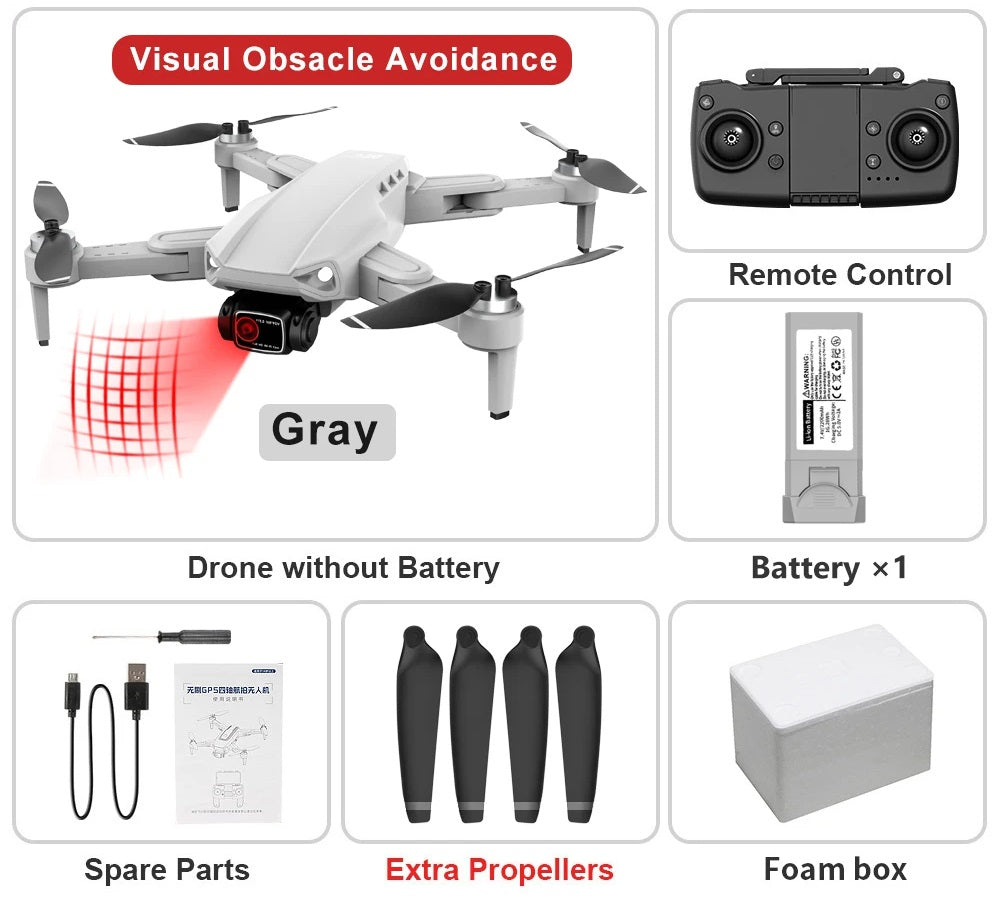
- Standard or front obstacle avoidance. The obstacle-avoidance version adds a forward-facing sensor meant to stop the drone before it flies into something ahead of it. It only looks forward, and thin branches, wires and glass can slip past any sensor like this, so fly slowly near obstacles.
- 1, 2 or 3 flight batteries. Each gives about 25 minutes of flying, per the supplier, and less in wind or cold. Spares let you keep flying while one charges.
- Foam box or zip carry case. The 1-battery kits come in either; the 2- and 3-battery kits come with the carry case.
Colors: black, gray or orange. The controller is black in every kit.
Before you fly in the US
The FAA rules, in plain English
- Take the free TRUST test. Every recreational drone pilot in the US must pass the FAA's free online Recreational UAS Safety Test and carry proof when flying.
- Weigh it. The supplier lists the drone at 220.4 g (7.8 oz). We have not weighed one ourselves, so put yours on a kitchen scale with the battery in and anything you have attached.
- Under 250 g and flown only for fun: you do not need to register it.
- 250 g or more, or any flying for work: register it with the FAA on FAADroneZone and fly with Remote ID. This drone has no built-in Remote ID, so you would attach an FAA-accepted Remote ID broadcast module, or fly only at an FAA-recognized identification area (FRIA). Flying for work also needs an FAA remote pilot certificate (Part 107).
- Every flight: stay under 400 ft, keep the drone where you can see it, and check the airspace with the FAA's B4UFLY service before you fly near an airport.
Rules change; the FAA's website has the current version.
In the box
What arrives
You also need a smartphone for live view, photos, video and the smart flight modes.

Specifications
The numbers
Figures are the supplier's unless marked. Ranges assume open space with no interference.